
In this update, we focused on operational control: preventing missed deadlines across the workspace and making outbound communication personal — increasing trust, clarifying context, and improving client response speed.
Tasks Due Escalation: Automatic Alerts for Tasks That Need Attention
Due dates in Trisk have always helped assignees stay on track.
Now, it’s easier for managers and responsible leaders to stay ahead of delays across the entire workspace — without manually checking task lists or opening workflows one by one.
With Tasks Due Escalation, you can set workspace-level rules that automatically notify selected people when tasks are approaching their due date or are already overdue.
What’s New
A new Tasks Due Escalation tab is now available under:
Main Menu → Governance → Profile → Tasks Due Escalation
Here, workspace admins (Tenant users) with the proper permission can create escalation rules that send summary emails about tasks that require attention.
Each rule lets you define:
- When to notify
Days in Advance
Example: notify 5 days before the due date
Special case: set 0 to notify only when tasks are already overdue
- Who to notify
Users
Select one or more users who should receive the escalation email notification.
The platform evaluates these rules across all active tasks in the workspace and sends:
– One summary email with the list of all matching tasks at that moment
– Direct links to open each task immediately
Different rules can notify different people at different times.
For example:
Operations lead — 5 days before due
Team manager — 2 days before due
Director — only when overdue
Why It Matters
In professional services work, delays rarely come from a lack of effort — they come from a lack of visibility.
When managers rely solely on manual checks, risks can be easy to miss across multiple clients and workflows.
Tasks Due Escalation gives leadership a simple early-warning layer:
- See risk sooner
- Intervene earlier
- Reduce last-minute surprises
- Protect deadlines across the workspace
It turns due dates into proactive signals.
Instead of manually monitoring, managers receive a single clear email with direct links to all matching tasks.
Important Notes
📌 This tool is permission-based. Only users with the “Change company information” permission can see the Tasks Due Escalation tab. (Main Menu → Governance → Profile → Change company information.)
📌 Completed, cancelled, or terminated tasks are automatically excluded from escalation notifications.
📌 Each escalation email is recorded in Governance → Communications → Communications Log for traceability.
Curious to see perfect automation in Your Context?
👉 Book a short walkthrough
👉 See how Trisk solutions map into your busiest workflows
👉 Compare your current cycle times with what automation can unlock
No hype.
No generic pitch.
Just a clearer look at how 2026 could feel less chaotic and more strategic.
Outbound Communications — Send Workflow Emails from Your Own Address
Workflow emails are critical: task assignments, reminders, approvals, and document reviews. But when every message comes from a generic system address, communication feels distant and easier to ignore.
This update expands Trisk’s personalization capabilities for outbound communications.
You can now send key workflow emails directly from your own verified email address — so recipients clearly see who took the action and why the message matters: more trust, more clarity, faster response.
At the same time, Trisk keeps full governance control, auditability, and safe fallbacks — so personalization never breaks reliability.
What’s New
Workspace admins (Tenant users) can now configure a personal outbound email address inside their User Profile and use it as the sender for action-driven workflow emails.
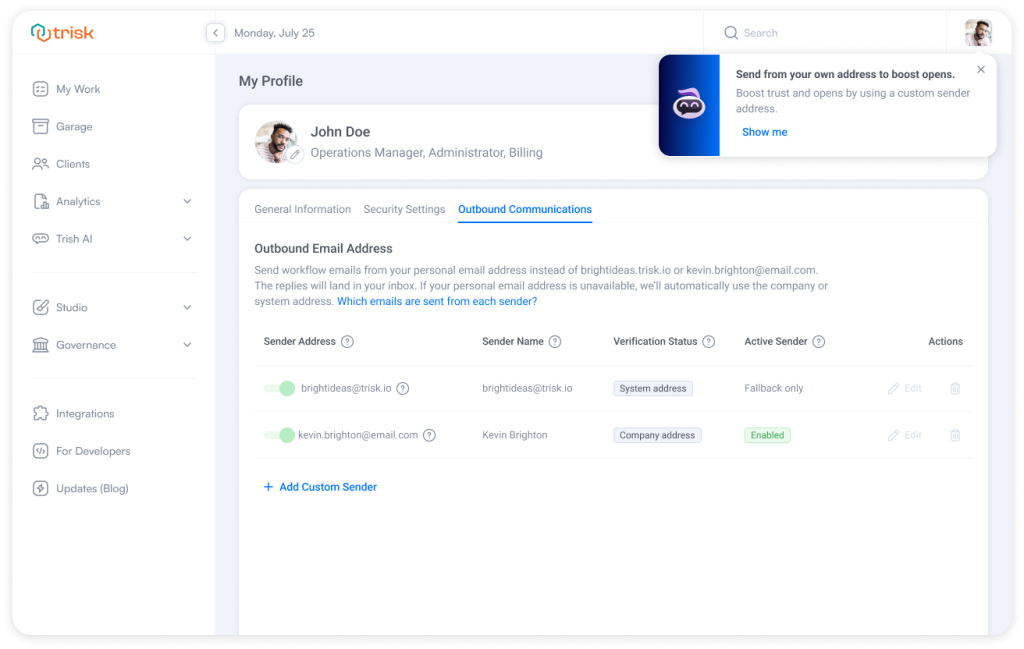 When enabled, emails triggered by your actions can come from:
you@yourcompany.com instead of system@trisk.io or a generic company sender, so messages feel personal and contextual.
Examples:
- You send a reminder → email comes from you
- You launch a workflow → first task notification comes from you
- You send a document for review → email comes from you
Automated platform emails (billing, system reports, password reset, etc.) continue to use the system sender email.
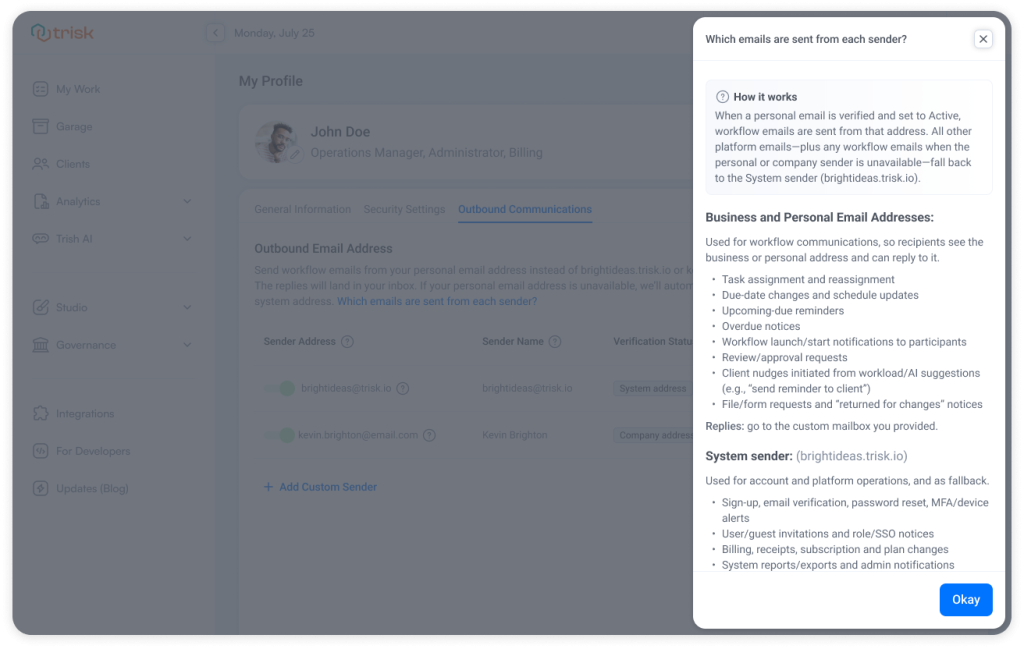 A Unified Outbound Communications Workspace
Outbound communication settings are now part of a redesigned User Profile experience with a new tabs structure:
- General Information
- Security Settings
- Notification Settings
- Outbound Communications
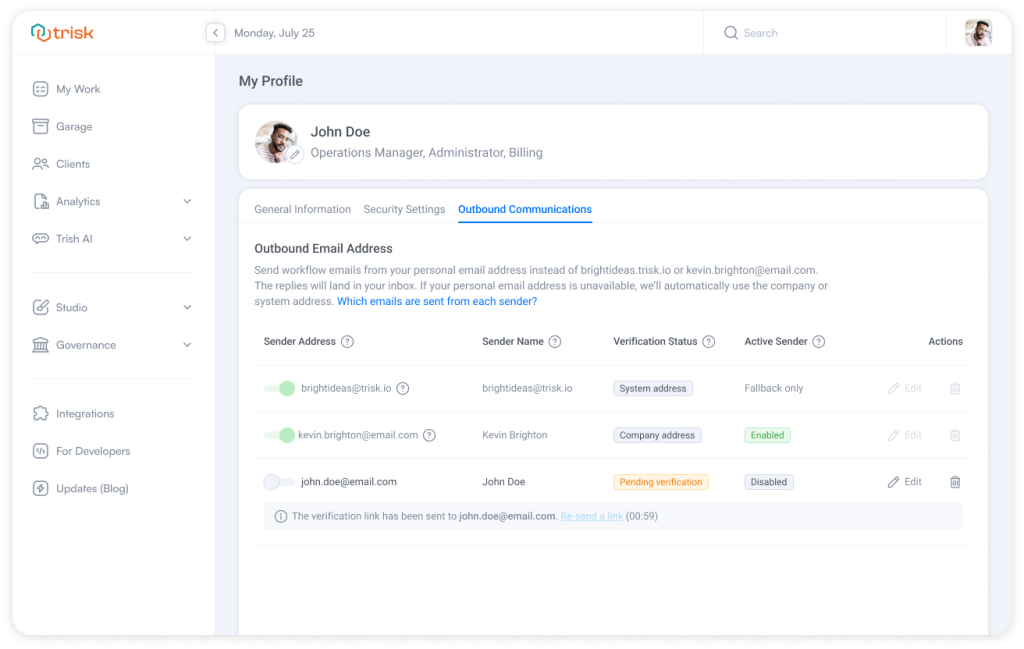 The Outbound Communications Tab gives workspace admins one clear place to manage:
- personal sender address
- verification status
- sender activation
- which email types use the personal sender
Client users do not see outbound sender settings.
Add and Verify Your Personal Sender
Tenant users can add one personal sender address to their profile.
The flow is simple and controlled:
- Add your email and sender name
- Receive a verification email
- Confirm ownership
- Activate the sender
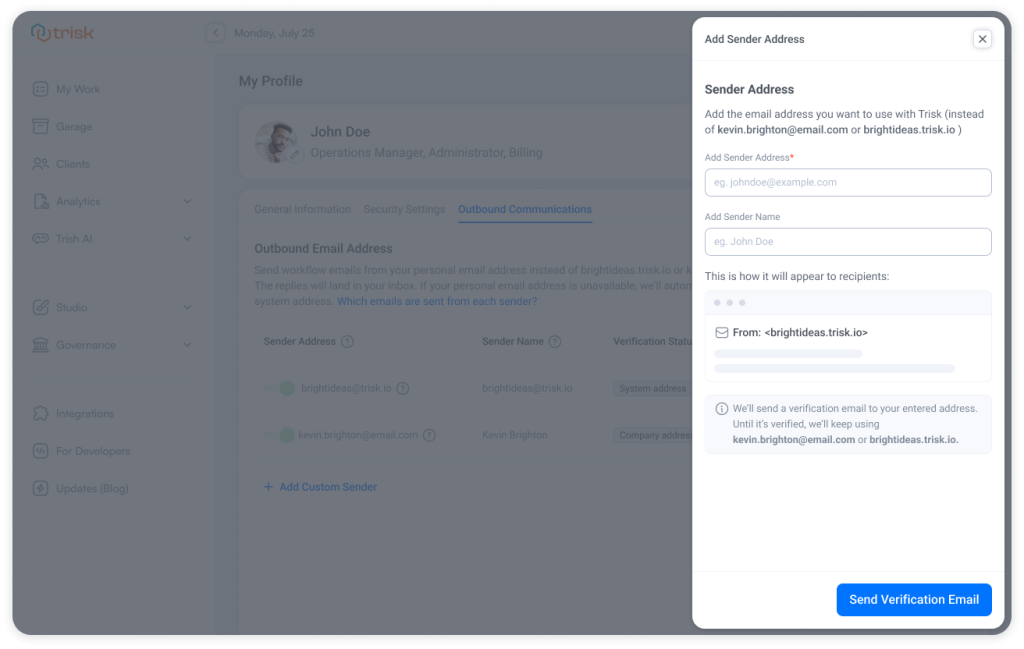 Until verification is complete, Trisk continues sending emails from the company or system sender — no delivery risk.
System sender always remains available as a fallback option and cannot be removed.
Choose Which Emails Use Your Personal Sender
After verification, you can control which message types are sent from your personal address.
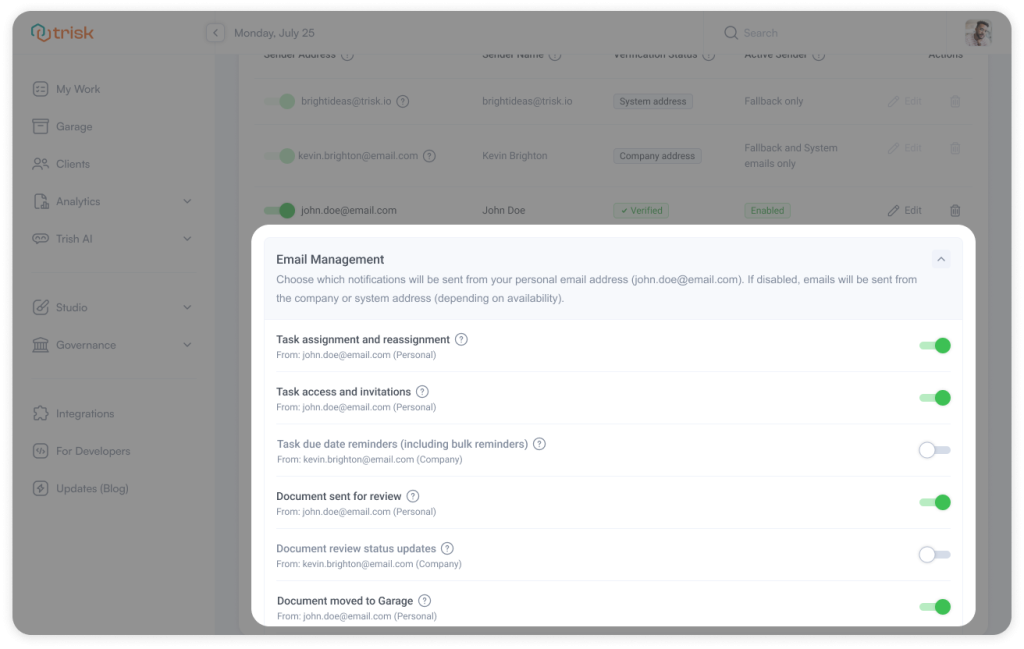 Examples of supported email types:
- task assignments and reassignments
- reminders
- workflow launch (first-task) notifications
- document review actions
- survey assignments
- coworking invitations
- Etc.
If disabled, those emails automatically fall back to:
Company sender → System sender
Sender Choice at the Moment of Action
When you trigger an action that sends notifications, Trisk can now show a Choose Sender Email step.
You can select:
- Personal sender
- Company sender
- System sender
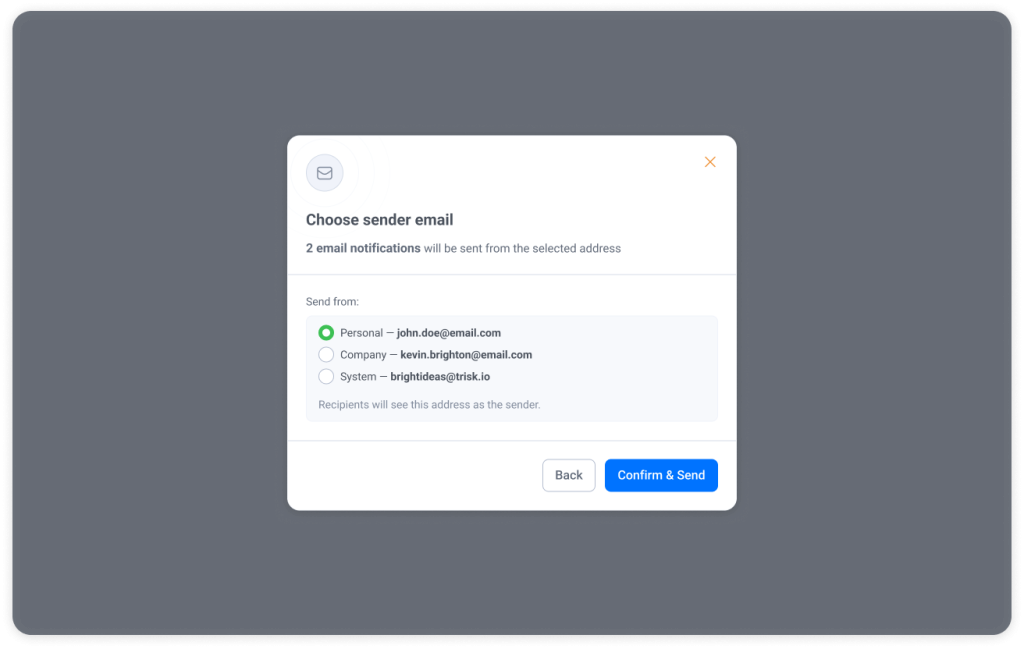
This provides flexibility without sacrificing control—especially useful when working across different client contexts.
Governance & Control Stay Centralized
Personal senders are fully governed at the admin (Tenant) level.
In Governance → Communications, authorized admins can:
- view all configured sender addresses
- turn personal senders on or off globally
- turn individual senders on or off
- edit or remove senders
- see who added each sender
- track verification and activation status
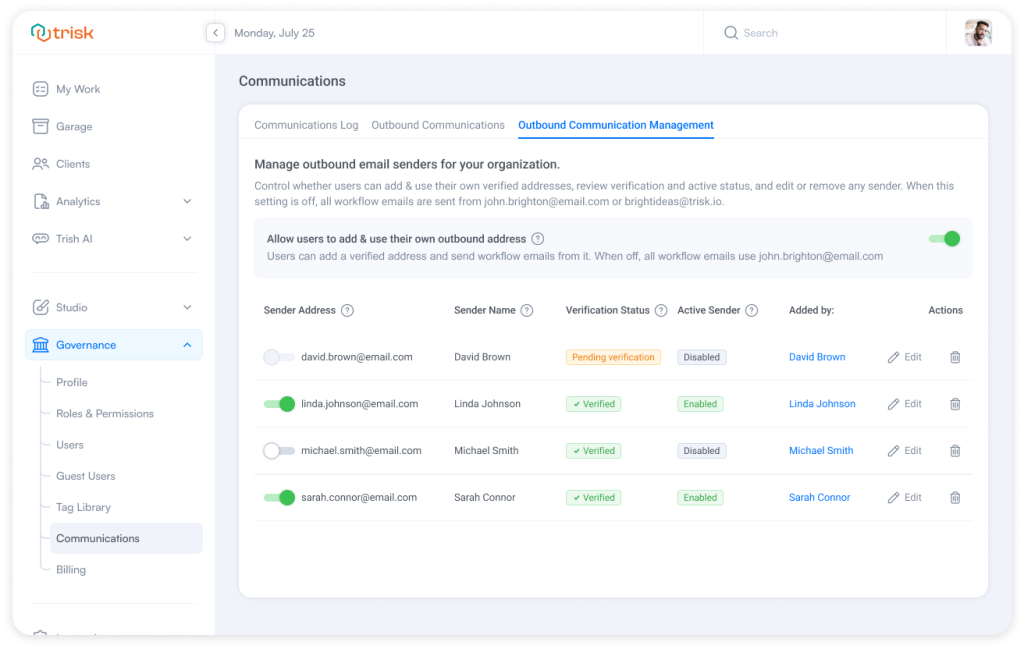
If personal outbound is disabled globally:
- user settings become read-only
- personal senders are automatically disabled
- all emails revert to company/system sender
- configurations are preserved for future re-enablement
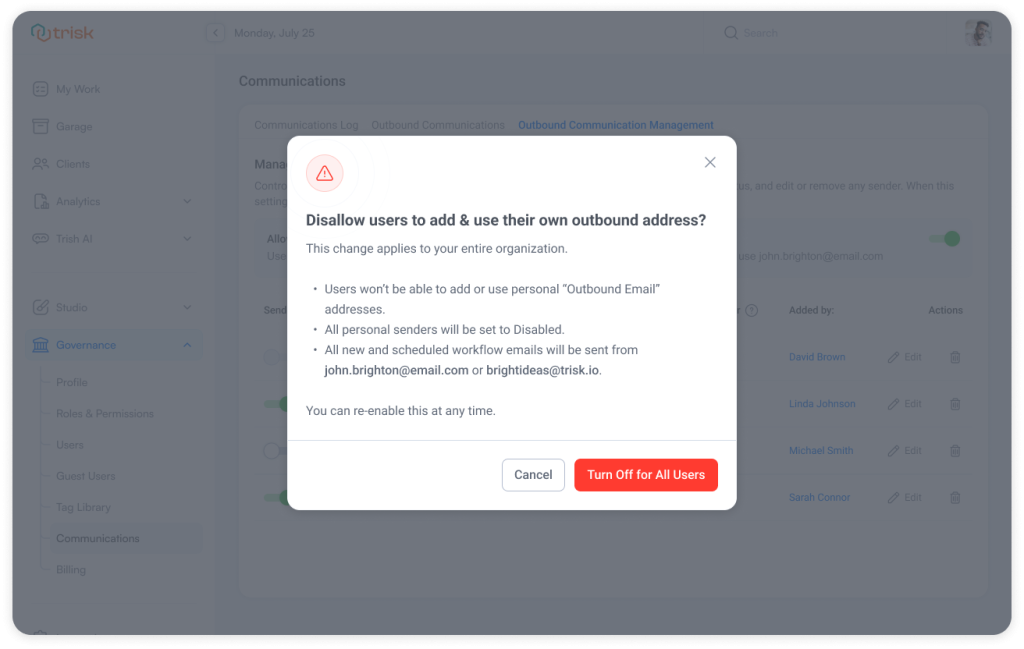 All changes are permission-based.
Full Auditability
Outbound sender usage is fully traceable.
You can see which sender address was used in:
Governance → Communications Log
This preserves transparency for:
- compliance
- internal controls
- client communication audits
Activity History behavior remains unchanged.
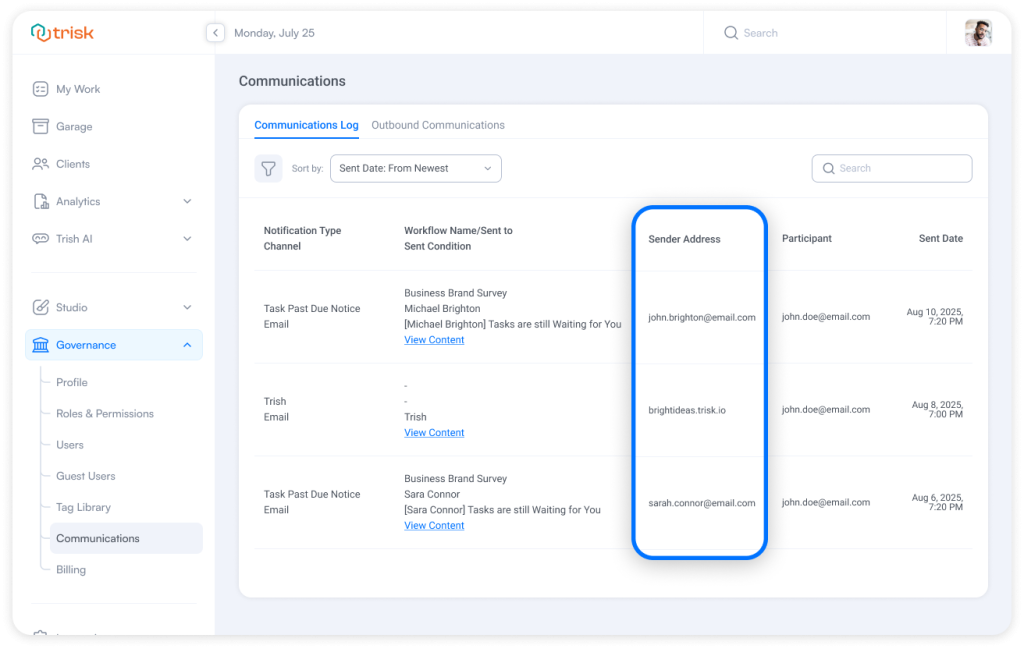
Plan & Availability
Personal outbound senders are available on: Teams & Business plans.
If a tenant downgrades:
- emails revert to system sender
- user configurations remain stored but inactive
Why This Matters
Clients respond faster when emails feel human — not automated.
Managers trust communications more when they clearly show who initiated the action.
Teams waste less time explaining context when the sender already provides it.
This update delivers:
- clearer accountability
- higher email trust
- more personal client communication
- preserved governance and fallback safety
- full audit visibility
Personal where it helps. Controlled where it matters.
Explore even more cutting-edge features that will add significant value to your Trisk experience:
- User Groups – Save Hours on Multi-User Assignments and Processes
- Your CRM Now Built into Trisk – tag and filter clients by status or category, and automate tagging based on form responses.
- What 2025 Revealed About Automation, AI, and How Modern Firms Actually Operate