
You can now view all task discussions, client messages, and email activity in one place, review forms using a structured feedback system with clear status indicators, and launch multi-stage workflows in bulk without manual repetition. And last but not least, rename Account Executive roles to match your organization’s terminology.
The result: faster reviews, less navigation, and clearer operational ownership.
Table of Contents
Communication & Visibility
– All Communications Centralized in “My Work”
– Email Triage & Outbound Log Inside Communications
– Task Conversations in a Single List
– Help Desk Conversations in the Same Workspace
Form Review Improvements
Workflow Automation
– Bulk Workflow Launch with Subsequent Workflows
Workspace Customization
– Custom Account Executive Role Titles
All Communications Centralized in “My Work”
Trisk already connects tasks, forms, documents, and client interactions. Now, communication across all of them is fully unified.
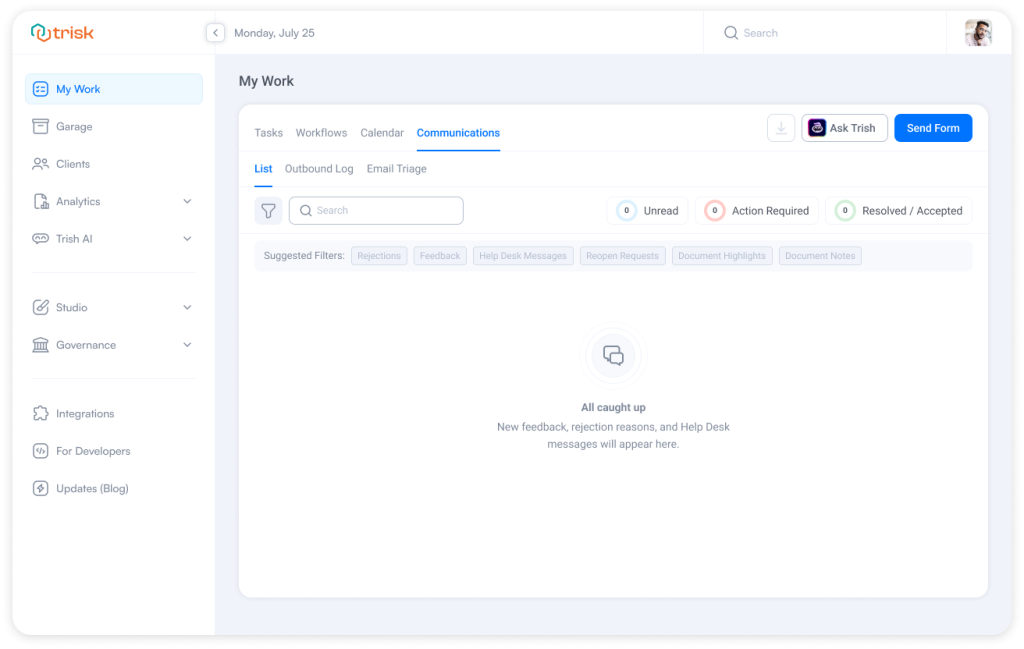
With this release, My Work → Communications becomes the central hub for task feedback, document discussions, email triage, outbound logs, and Help Desk conversations—now visible in a single structured, reactive workspace.
Email Triage & Outbound Log Unified Under My Work
Email Triage and Outbound Log are now accessible directly under My Work → Communications, bringing all communication-related activity into one consistent, centralized hub. The functionality stays the same. The experience becomes cleaner.
What’s New
Under My Work → Communications, you can now see three clearly organized sections:
- List – for task-related discussions
- Email Triage – for managing incoming emails
- Outbound Log – for tracking outgoing messages
Important Notes
📌 Existing permissions remain unchanged.
📌 Visibility rules for Email Triage and Outbound Log are preserved.
📌 No behavioral changes to filtering, actions, or tracking.
📌 This is an organizational improvement—functionality remains exactly as you know it.
There’s no relearning required. No new logic to understand. The tools are grouped to reduce navigation jumps and improve operational clarity.
Why This Matters
In firms handling client onboarding, document reviews, compliance approvals, and transaction workflows, communication is not separate from execution. It is execution.
Consider a legal team reviewing a contract negotiation.
They need to:
– Check internal feedback
– Confirm what was sent externally
– Review incoming responses
– Track what’s still pending
Previously, this meant switching between different sections of the platform.
Now, all communication-related content is in one structured area. My Work becomes a true operational command center.
See All Task Conversations in One Structured List
When multiple workflows are active—client onboarding, contract review, compliance approval—conversations happen across the board. A rejection reason inside a form. A highlight inside a contract. A follow-up reply is buried in a document discussion.
Now, they’re visible together.
What’s New
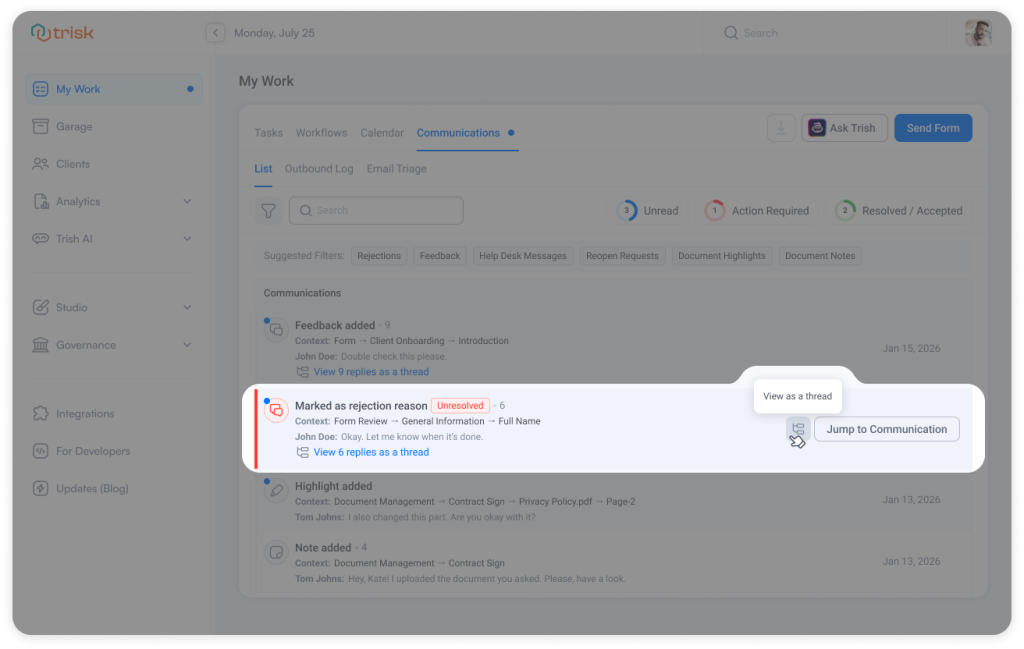
A new tab List on My Work page (My Work→Communications→ List) that:
- Aggregates all task-related communication visible to the workspace admins (tenant users)
- Clearly marks unread, unresolved, and resolved items
- Allows filtering and sorting
- Let’s you expand full threads
- Enables direct navigation to the related form or document
- Updates in real time when new messages arrive
- Follows the familiar Task List structure for consistency
How It Works
Open My Work → Communications → List
Each row represents a communication entry and includes:
– Clear status indicators
– Context (form, task, document, page reference)
– A preview of the latest message
– Thread visibility if replies exist
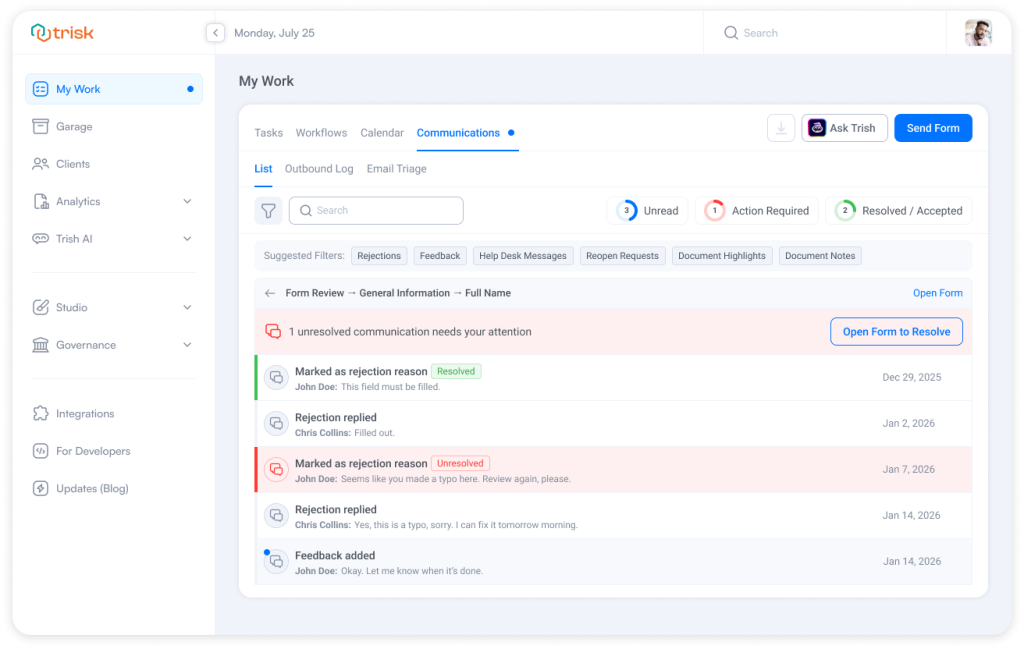
Clicking a communication opens an Extended View with:
– Full thread displayed
– Action summary if something remains unresolved
– Direct “Open Form to Resolve” access when applicable
– Quick navigation back to the list
Why This Matters
Imagine a tax manager during filing season.
Ten active client workflows.
Multiple form corrections.
Two document highlights.
Three reopen requests.
Instead of opening each workflow separately to check what needs attention, the manager opens Communications and immediately sees:
– 3 Unread
– 2 Action Required
– 5 Resolved
One list. One decision point. The result:
- Faster response times
- Fewer missed comments
- Clear accountability
- Less mental overhead
Important Notes:
📌 The Communications List tab is only visible to workspace admins (tenant users). It only displays communications for tasks and clients they have permission to access.
Help Desk Conversations Now Visible Inside Communications
Help Desk in Trisk provides structured client communication. Now it’s even more connected to your operational workflow.
With this update, Help Desk conversations appear directly inside My Work → Communications. Teams can see task-related messages and client chats in one structured list, while the standalone Help Desk module remains fully available and unchanged.
What’s New
- Help Desk client communication is now visible inside My Work → Communications.
- All existing permissions remain unchanged. Users only see Help Desk conversations they already have access to.
Why This Matters
Picture a consulting firm managing a client onboarding project.
A form correction is submitted.
The client also sends a Help Desk message about a document upload.
Instead of checking separate modules to reconstruct the conversation, the project manager sees:
– The Form Feedback
– The Help Desk question
All inside one structured list.
This reduces delays, prevents overlooked messages, and keeps client communication professional and timely.
Curious to see perfect automation in Your Context?
👉 Book a short walkthrough
👉 See how Trisk solutions map into your busiest workflows
👉 Compare your current cycle times with what automation can unlock
No hype.
No generic pitch.
Just a clearer look at how 2026 could feel less chaotic and more strategic.
Unified Feedback System for Form Review
Forms in Trisk are designed to guide structured data collection. Now, collaboration inside those forms is just as structured.
We are happy to introduce a unified Feedback system that replaces field-level Notes, Comments, and Discussions with a single, consistent communication model, making collaboration faster, more transparent, and easier to manage.
The result: clearer reviews, faster approvals, and stronger audit visibility.
What’s New
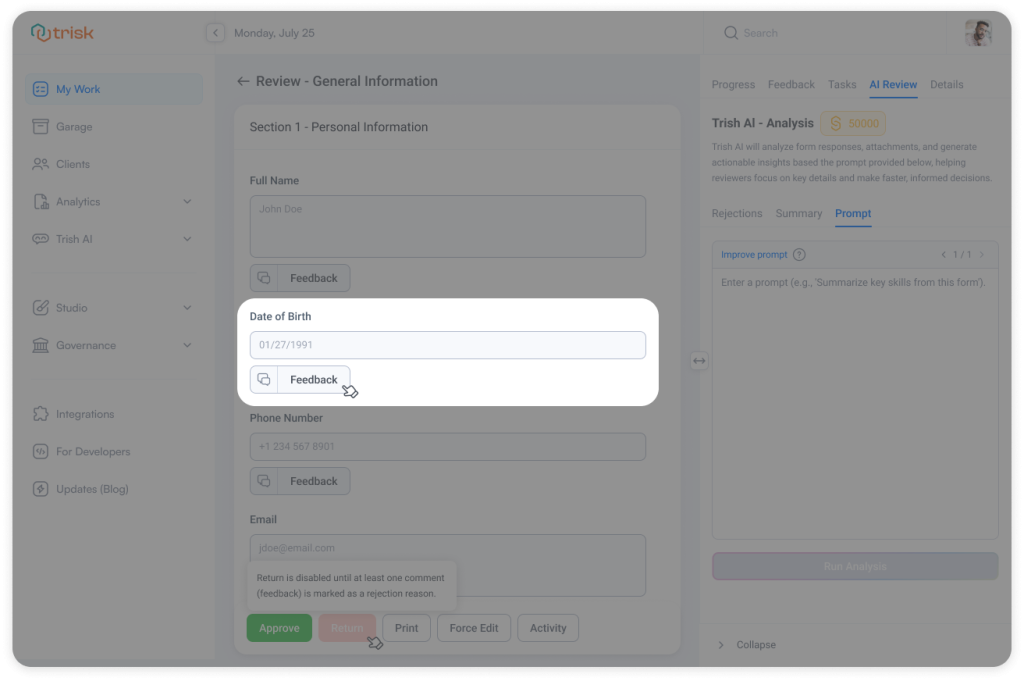
Every field, grouper, and grid now includes a Feedback button.
Instead of separate communication types, all interaction happens inside one structured thread:
- Ask clarifying questions
- Mark issues as rejection reasons
- Reply directly in context
- Resolve or reopen discussions
- Attach supporting documents
Each field shows a message counter and a clear status indicator, so reviewers instantly understand whether action is required.
Status colors provide immediate clarity:
Red – An unresolved rejection exists (approval is blocked)
Blue – New unread messages require attention
Green – A rejection was resolved
Grey – All communication is read and resolved
This visual structure removes ambiguity from the review process.
Review Experience
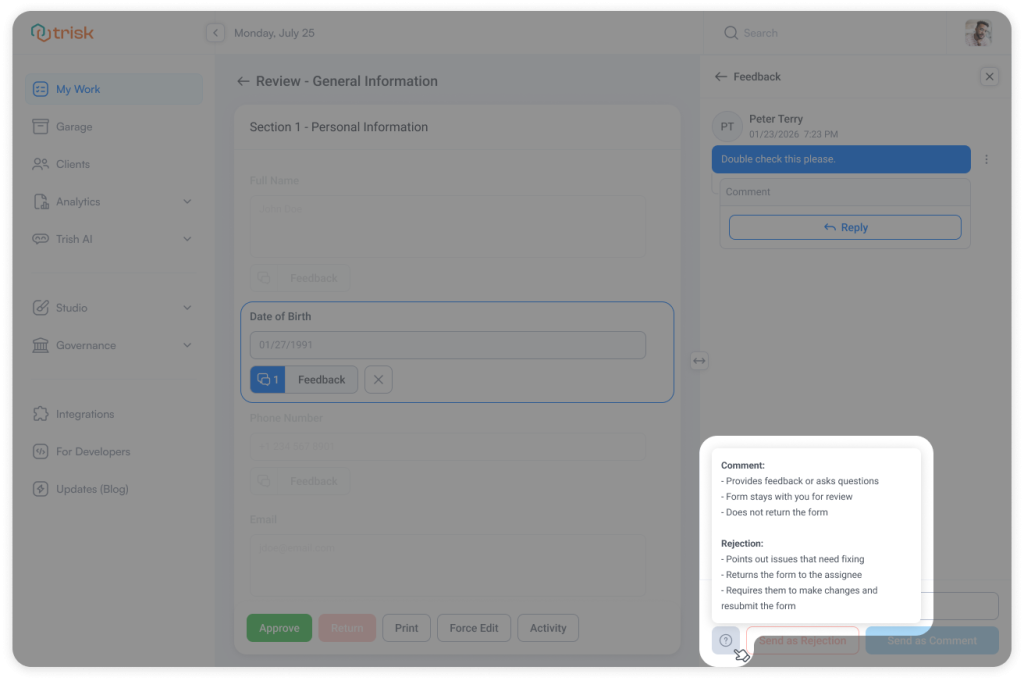
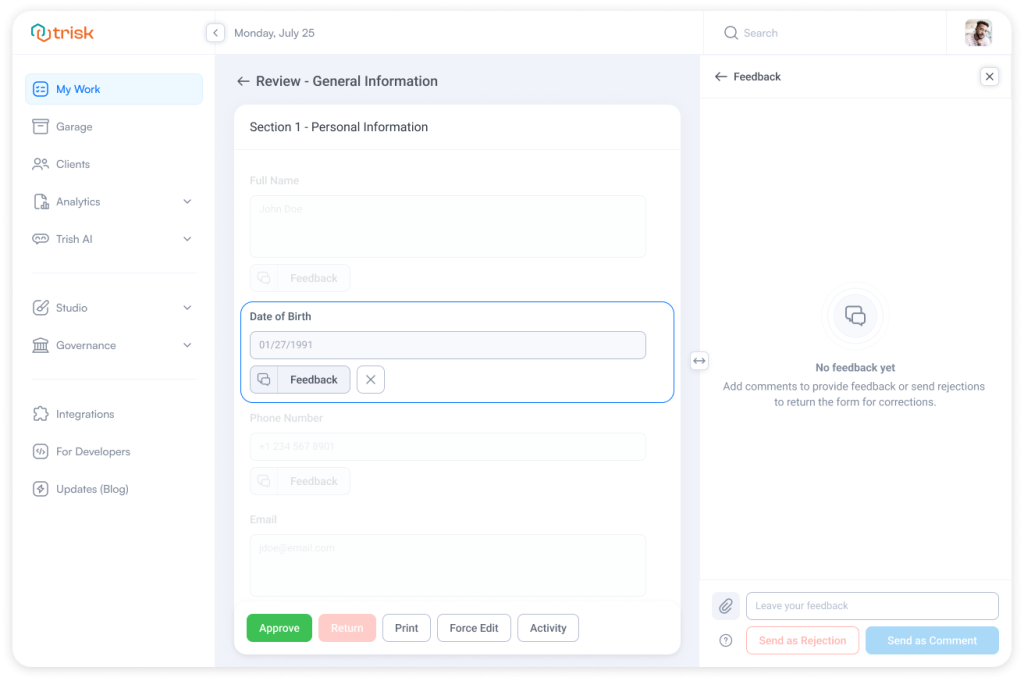
When Feedback is opened:
– The selected field is highlighted
– Other fields fade into the background
– A dedicated chat panel opens
Reviewers stay focused on the specific issue without distraction. Collaboration happens exactly where the data lives.
 For professional service teams handling high-volume client submissions, this reduces back-and-forth and keeps attention aligned with the actual data point under discussion.
Rejection Logic with Built-In Control
Enjoy feedback with structured rejection handling.
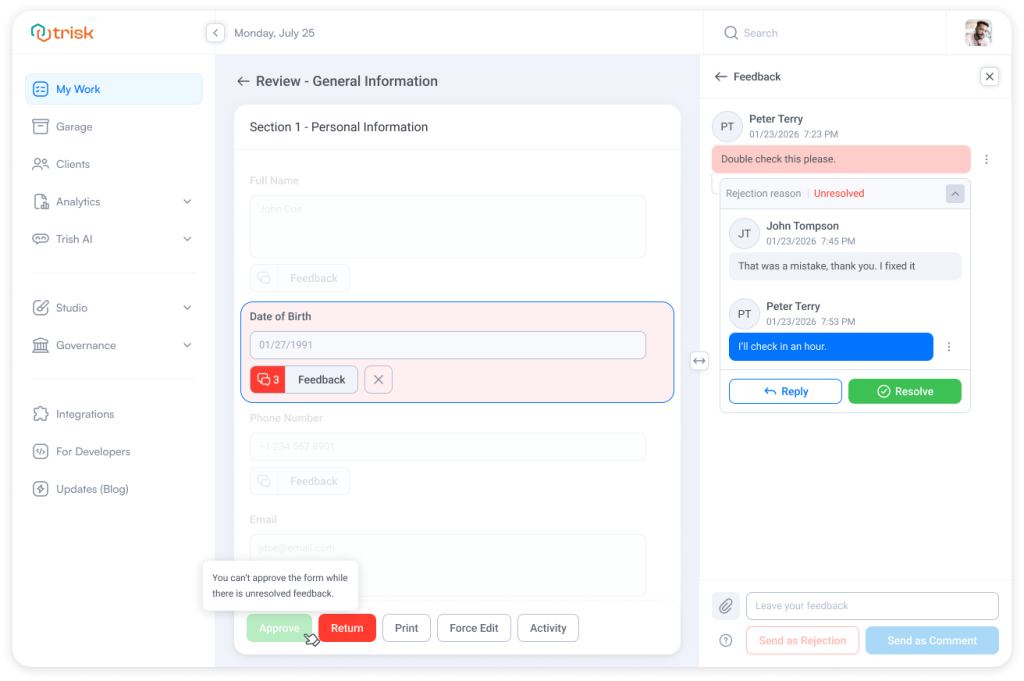
If a field is marked as a rejection reason:
- The form cannot be approved until it is resolved
- The field remains clearly marked
- The thread stays visible until closed
Users can:
- Reply
- Reply & Resolve (which resolves the rejection in one action)
- Convert comments into rejections (and vice versa)
- Reopen resolved threads
This ensures that critical issues are never overlooked.
The workflow remains structured and controlled — without external emails or side conversations.
Smarter Review Flow
Review behavior is now more intentional:
- On first entry into Review, the AI Review tab opens by default, ensuring reviewers see automated insights first.
- If a form is returned with feedback, the Feedback tab opens automatically, so unresolved items are immediately visible.
- A Next Unresolved Feedback button guides reviewers sequentially through open issues.
This is especially valuable in long compliance forms, tax organizers, onboarding packets, or regulatory submissions where multiple fields may require attention.
Dedicated Feedback Tab Inside the Form
A new Feedback tab provides a complete overview of communication related to the form.
It includes:
– All field-level communication
– Clear color-coded status indicators
– Thread counters
– Search, sorting, and filtering
– Real-time updates
Clicking a message jumps directly to the associated field.
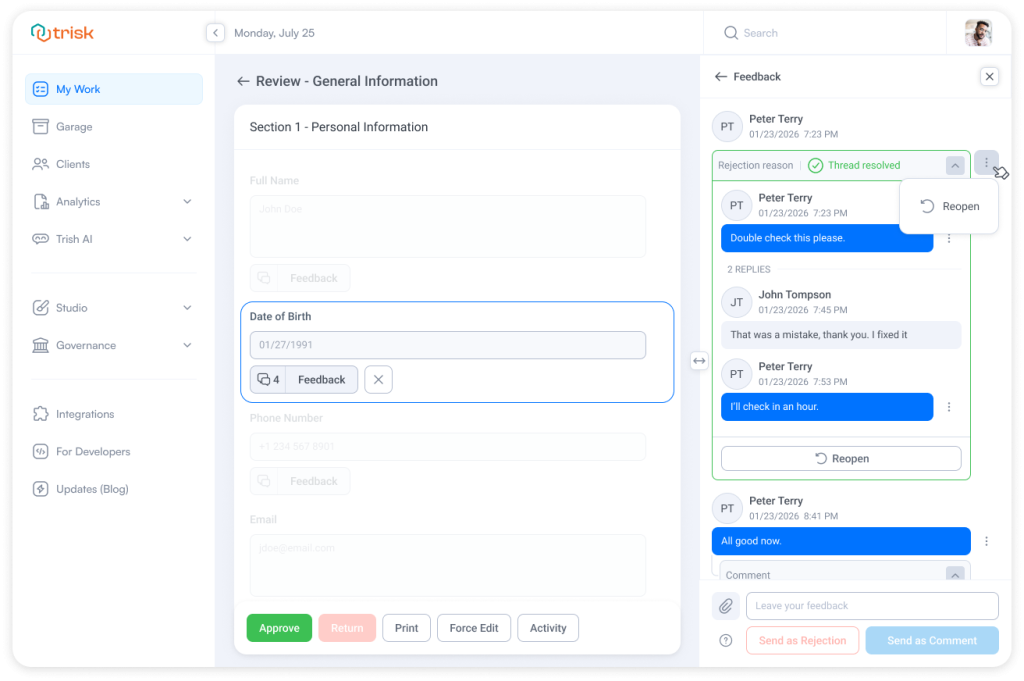
This gives managers and senior reviewers full visibility into what is unresolved, what has been clarified, and what has been completed — without manually opening multiple fields.
File Attachments Inside Feedback
Feedback threads now support file attachments.
You can:
- Upload from your computer
- Attach files directly from the Garage
Files remain linked to the task and are stored within the system for full audit visibility.
For legal, accounting, and consulting teams, this ensures supporting documentation stays connected to the exact issue it addresses.
Why This Matters
In professional service firms, review is not just data validation — it is risk control.
Tax returns.
Client onboarding.
Legal contract review.
Compliance documentation.
Due diligence checklists.
Each unresolved question represents potential liability or delay.
With this update:
- Issues are attached directly to fields
- Rejections visibly block approval
- All conversations are structured and auditable
- Review cycles become faster and more predictable
Forms were already structured.
Now, collaboration around them is equally structured.
Bulk Workflow Launch Now Supports Templates with Subsequent Workflows
Bulk workflow launch is a major time-saver when starting the same process for many clients at once.
Now it works even more broadly.
You can bulk-launch workflow templates that include Subsequent Workflow steps, so multi-stage, chained processes can now be started in one action, just like standard workflows.
What’s New
Workflow templates that include Subsequent Workflow tasks can now be used in bulk launch.
Behavior matches individual workflow launch — just at scale.
– Subsequent Workflow steps are included automatically
– Task order and dependencies stay intact
– Follow-up workflows trigger according to your template rules
No special setup required.
Why It Matters
Many firms design workflow templates that don’t stop at one process — they automatically trigger the next stage: follow-ups, reviews, renewals, secondary checks.
Until now, those advanced templates required manual, one-by-one launching.
Now you can start full workflow chains in bulk:
- Faster onboarding waves
- Faster renewals and recurring cycles
- Consistent multi-stage execution
- No manual repetition
It’s the same structured automation — now scalable from the very first click.
Account Executive Roles: Use Your Own Titles Across Trisk
Every firm speaks its own operational language.
Some say Operational Manager. Others say Delivery Lead, Engagement Manager, or Client Success Owner.
Now Trisk adapts to your terminology.
You can rename the built-in Account Executive role titles to match how your organization actually works while keeping all permissions and behavior the same.
What’s New
Tenant admins can now edit the display titles of system Account Executive roles.
This allows you to align your Trisk workspace with your internal naming without changing role logic, access, or responsibilities.
For example, you can rename:
- Operational → Delivery Manager
- Administrative → Client Coordinator
The updated titles will appear consistently across the platform.
Why It Matters
Professional service organizations rarely use identical role titles. When software forces fixed labels, teams must constantly translate between “system language” and “company language.”
That small friction adds up — in onboarding, reporting, communication, and training.
Now your workspace speaks your language:
- Clearer role ownership
- More natural reports and emails
- Better alignment with your org structure
- Less internal confusion
Same trusted role model — now with terminology that fits your firm.
Key Improvements in This Release
✔ Centralized communication workspace
✔ Structured task discussion list
✔ Help Desk messages integrated into operations
✔ Unified feedback system for forms
✔ Bulk workflow launch with multi-stage automation
✔ Customizable role titles
Together, these updates make Trisk faster to operate, easier to review, and clearer for teams managing complex workflows.
Explore even more cutting-edge features that will add significant value to your Trisk experience:
- Tasks Due Escalation – stay ahead of delays across the entire workspace — without manually checking tasks.
- What 2025 Revealed About Automation, AI, and How Modern Firms Actually Operate
- User Groups – Save Hours on Multi-User Assignments and Processes