
This release makes Trish AI a more capable everyday assistant. Ask questions about your work, uncover potential client delays, get reliable guidance on using Trisk, and move directly to the tasks and workflows that need attention.
We’ve also improved Email Triage, helping incoming messages stay connected to the right clients and work.
Know Why Client Work Is Stalled—and What Needs Attention
Find out which client tasks are stalled, what may be causing delays, and where follow-up is needed—simply by asking Trish.
We’ve expanded Trish AI’s ability to analyze client work across tasks, workflows, communications, and activity history, giving managers a clearer picture of what’s happening and what needs attention.
Instead of investigating each source separately, you can get a concise summary with supporting records to help you identify potential blockers and take the next step faster.
What’s New
Trish can now bring together information from multiple sources to answer questions about a client’s work.
Instead of reviewing each source separately, you can ask Trish to investigate a situation and receive a concise summary supported by the relevant records.
Trish draws on:
- Tasks and Workflows to understand the current state of work, assignments, and progress.
- Activity History to identify changes and recent activity.
- Task and Helpdesk Communications to find relevant conversations and follow-ups.
- Documentation to provide additional context when relevant.
Answers include supporting tables and links to the original records, so you can verify the findings and investigate further when needed.
How It Works
Ask Trish questions such as:
- “Why has work for this client stopped?”
- “What changed on this client’s tasks last week?”
- “Which client tasks need follow-up?”
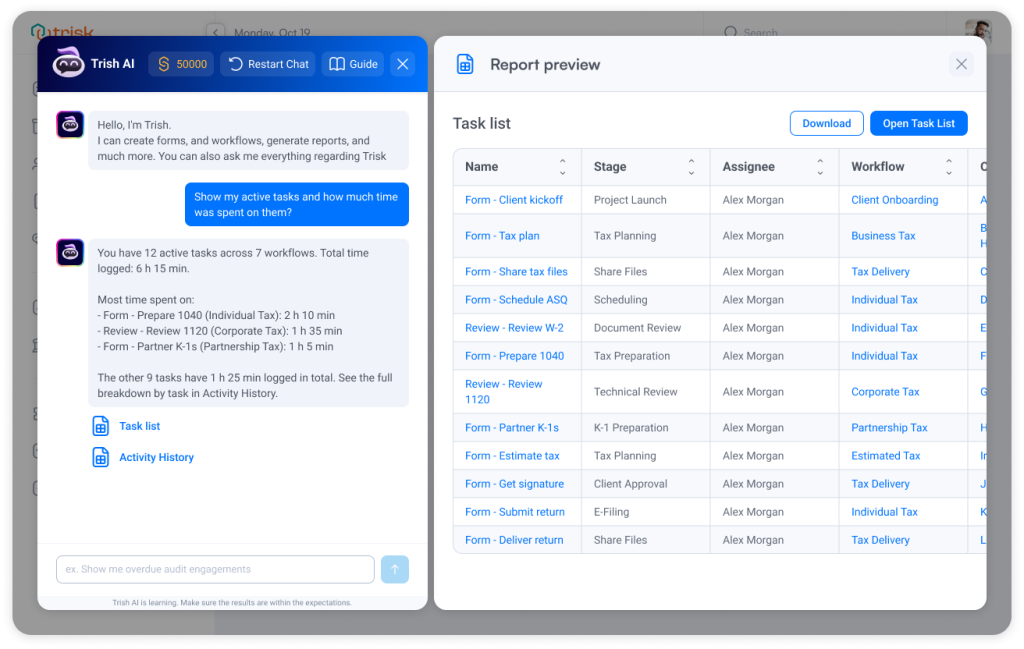
- “Show my active tasks and how much time was spent on them.”
Trish identifies the relevant client, timeframe, and other details in your question, then searches the available information.
When a question requires multiple sources, Trish combines the findings into one answer. For example, it might identify tasks that haven’t progressed, highlight recent activity, and surface related conversations that could explain the delay.
You can then open the supporting records, review the context, and decide whether to follow up with the client, contact a team member, or take action on a task.
If the available information isn’t enough to explain a situation reliably, Trish makes that clear and will not present assumptions as facts.
Business Impact
Spot Potential Delays Earlier
Identify client work that may need attention before missed deadlines or unresolved issues become bigger problems.
Spend Less Time Investigating
Bring together relevant tasks, conversations, and activity records without searching through each area manually.
Make Better-Informed Decisions
Understand what has happened, review supporting evidence, and determine the next step with greater confidence.
Keep Client Work Moving
Turn findings into timely, focused follow-ups that help teams address blockers and maintain progress.
Trish helps managers move from noticing that work has slowed down to understanding what needs attention—with the relevant context and supporting records in one place.
Permissions & Availability
Permissions: Trish respects existing workspace, client, task, and Helpdesk access permissions. Answers and supporting records include only information users are authorized to view. Personal information is protected during AI processing.
Availability: Available through Trish AI for supported client-work questions, subject to your organization’s plan and enabled AI features.
Get Help Using Trisk Without Searching Documentation or Contacting Support
Finding out how to do something in Trisk is as simple as asking a question.
We’ve improved Trish AI’s knowledge, making it easier to get consistent, reliable answers to everyday how-to questions without searching through documentation or contacting Support.
What’s New
Trish now provides more consistent answers to supported questions about using Trisk.
Trish draws on two trusted sources:
- Trisk Documentation for guidance on platform features and how to use them.
- Organizational Knowledge for company-specific information that your organization has made available to AI.
This gives Trish a dependable foundation for answering questions while keeping company-specific knowledge protected within your workspace.
How It Works
You can ask Trish questions naturally, for example :
- “How do I reassign a task?
- “Can I change who is responsible for a task?”
- “Where can I update a task’s assignee?”
Although these questions are phrased differently, they’re asking about the same action. Trish now uses the available documentation to provide consistent guidance no matter how you phrase the question.
When relevant, Trish can also reference AI-enabled Organizational Knowledge available to your organization, helping you find guidance specific to how your company works.
Business Impact
Find Answers Faster
Get practical guidance on using Trisk without searching through documentation or waiting for Support.
Help Teams Work Independently
Give employees a reliable way to learn features and complete unfamiliar actions with greater confidence.
Reduce Routine Support Requests
Make common how-to answers easier to access, freeing up Support to answer questions that need more attention faster.
Trish AI becomes a more useful everyday assistant—helping you find answers faster, learn Trisk with greater confidence, and spend less time looking for help.
Find Tasks, Workflows, and Overdue Work Just by Asking Trish AI
We’ve improved Trish AI’s reporting capabilities, so you can find tasks, workflows, and relevant client work using everyday language without manually combining filters or building reports.
What’s New
Trish turns your questions into actionable task and workflow results, using filters and access permissions available in Trisk.
Instead of generating a separate report, Trish helps you find the work you’re looking for and gives you ways to act on it.
You can:
Ask questions naturally to find assigned, overdue, or client-related work.
Preview matching results with the details you need to identify the right tasks or workflows.
Open Task List or Workflow List with the relevant filters already applied, so you can continue working without repeating your search.
Download results using the available export options.
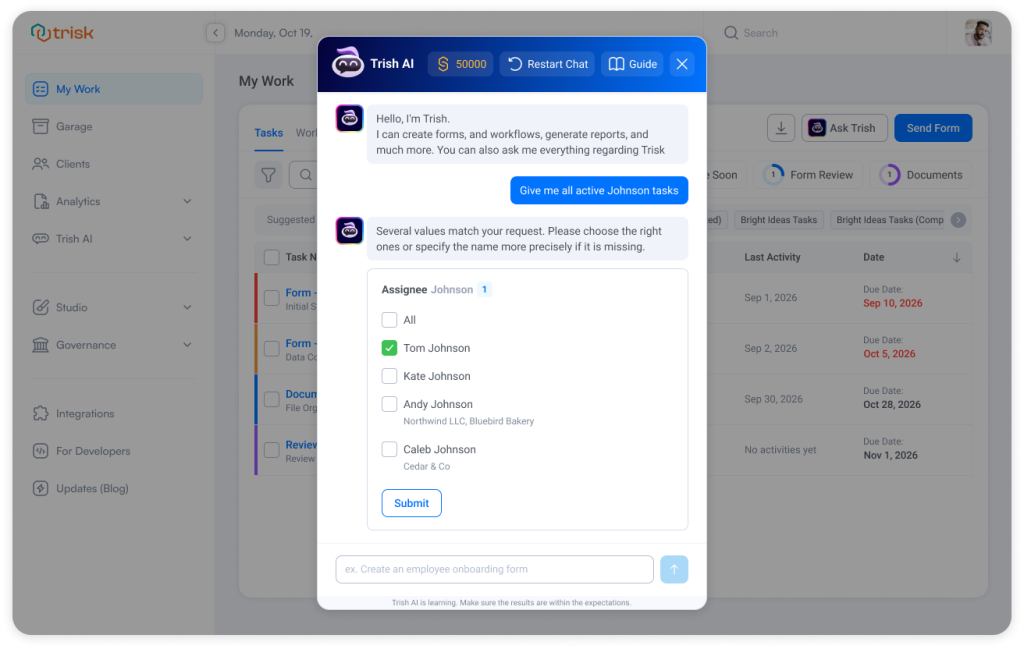
Clarify ambiguous requests when multiple people, clients, or workflows match your question, so you don’t get results for the wrong one.
How It Works
Ask Trish a question such as:
- “What is assigned to me?”
- “Which tasks are overdue?”
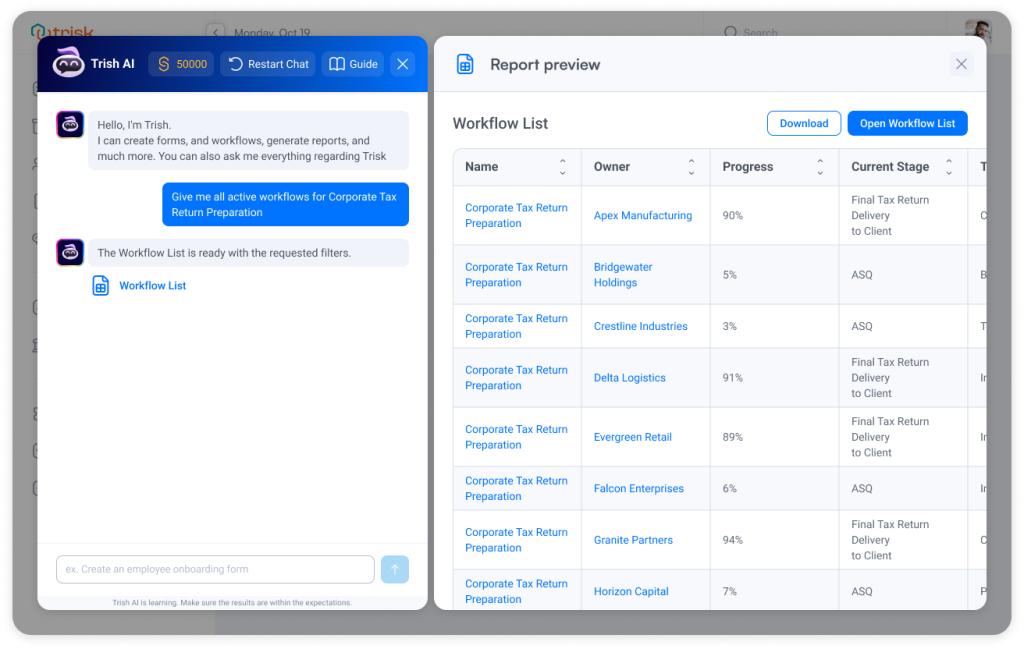
- “Show me all active workflows for Corporate Tax Return Preparation.”
Trish identifies the relevant search criteria and returns matching work based on what you’re allowed to access.
If your question could refer to multiple people or clients—for example, “Show me all active Johnson tasks”—Trish asks you to choose the right person before continuing.
You can review the results, open an individual item, or move directly to the corresponding Task List or Workflow List with your filters preserved.
Business Impact
Find Work Faster
Get straight to the tasks and workflows you need without navigating multiple lists or building complex filters.
Turn Questions Into Action
Move directly from a question to relevant work, with the ability to open items, review details, or continue in the full list.
Get More Precise Results
Trish asks for clarification when needed and respects your existing access permissions, helping you find the right information.
Reduce Manual Reporting
Answer common questions about assignments, deadlines, and workflow progress without creating separate reports or contacting Support.
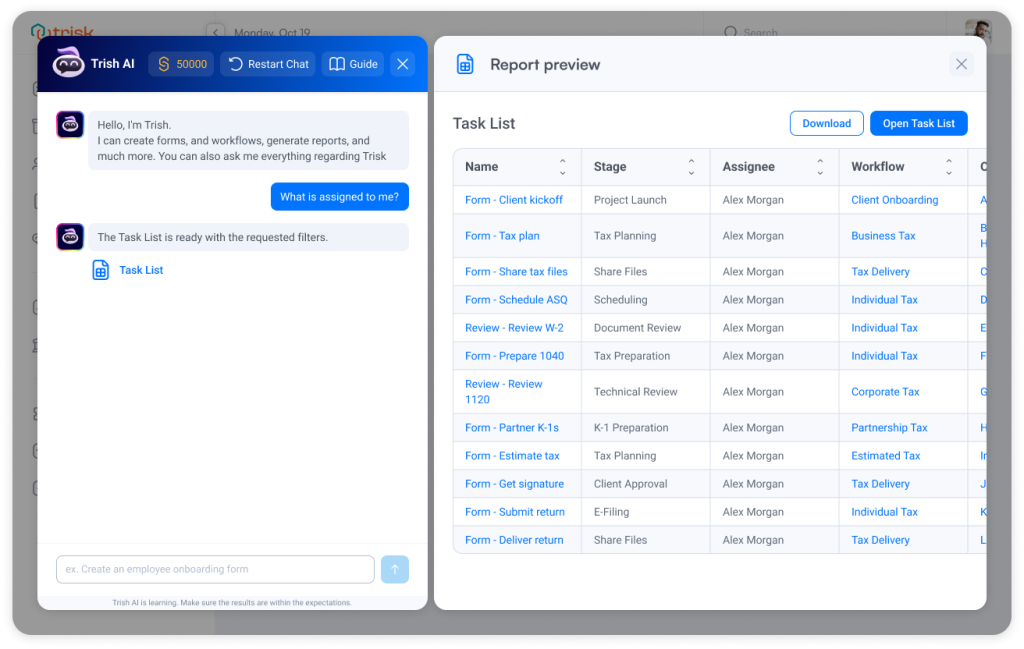 Trish AI makes it easier to move from “What do I need to know?” to “What do I need to do?”—with relevant work ready to review and act on.
Permissions
Permissions: Trish AI respects your existing workspace permissions and visibility settings. Search results include only tasks, workflows, and client information you’re authorized to access. No additional permissions are granted.
Curious to see perfect automation with Trish AI in Your Context?
👉 Book a short walkthrough
👉 See how Trisk solutions map into your busiest workflows
👉 Compare your current cycle times with what automation can unlock
No hype.
No generic pitch.
Just a clearer look at how work could feel less chaotic and more strategic.
Improved Email Triage with More Accurate Client and Task Matching
We’ve improved the search technology behind Email Triage, making Trish better at recognizing incoming client emails and connecting them to the right work.
What’s Improved
When an email arrives, Trish continues to identify the relevant client, suggest an appropriate workflow template, and find existing tasks that may be related to the message.
The improvements help ensure that:
- Client and task matches stay current. New clients, renamed records, workflow changes, and task updates are reflected in search.
- Outdated records don’t appear in suggestions. Deleted clients, workflows, and tasks are no longer returned as matches.
- Access stays protected. Email Triage only uses information from the appropriate company and suggests tasks the user is authorized to access.
Business Impact
Keep Email Triage Dependable
Help incoming messages reach the right client and related work using current information.
Reduce Unnecessary Review
Trish recognizes excluded emails and marks them as irrelevant, helping prevent unnecessary triage suggestions.
Maintain Accurate Suggestions
Keep client, workflow, and task matches aligned with changes across your workspace.
Continue Working as Usual
Benefit from improved reliability without changing your existing Email Triage process or learning a new workflow.
These improvements happen behind the scenes, with the existing Email Triage experience and permissions remaining unchanged.
Explore even more cutting-edge features that will add significant value to your Trisk experience:
- Email Triage with Trish AI – Reclaim 200+ Hours/Year per Employee
- AI that Thinks Like Your Team – Input your company’s policies, guidelines, and key processes once—Trish AI will use that knowledge to deliver smarter, more accurate results across forms, workflows, reviews, email triage, and other AI-driven tasks.
- Proactively surface inactive users — reduce unnecessary access and maintain stronger security and compliance practices.